

Loops, routes and review decisions
Real processes go back, wait, fail and ask people to decide. This page shows each of these shapes in APL, what the engine guarantees, and how to edit it in Studio. The tutorial uses all of them in one process.
| You want to… | Use |
|---|---|
| Redo a step after a rejection, but not forever | loop |
| Let a reviewer choose what happens next, with a reason | outcomes |
| Send weak or malformed AI answers to a person | on_low_confidence, on_invalid_output |
| Handle a failed step | on_error |
| Stop a step that takes too long | on_timeout |
| Escalate a human task that is late, without cancelling it | sla_hours, escalate_to |
| Survive a rate-limited or unavailable model | fallback_models |
Repeat a step with a limit
Section titled “Repeat a step with a limit”A process may go back to an earlier step as long as that step says how many times it may run:
- id: draft type: agent loop: { max_iterations: 3, on_exhausted: triage } next: review- The engine counts the passes in
draft_iteration(1, 2, 3…), which a prompt or a condition can read. - After the third pass, the next arrival continues at
on_exhausted. Withouton_exhausted, the instance stops atdraftwith aLOOP_EXHAUSTEDincident that an operator resolves (see Operate running processes). - A cycle whose target declares no
loopis refused at deployment. A cycle cannot return to the start node, a parallel or an inclusive gateway. - Each parallel branch counts its own passes.
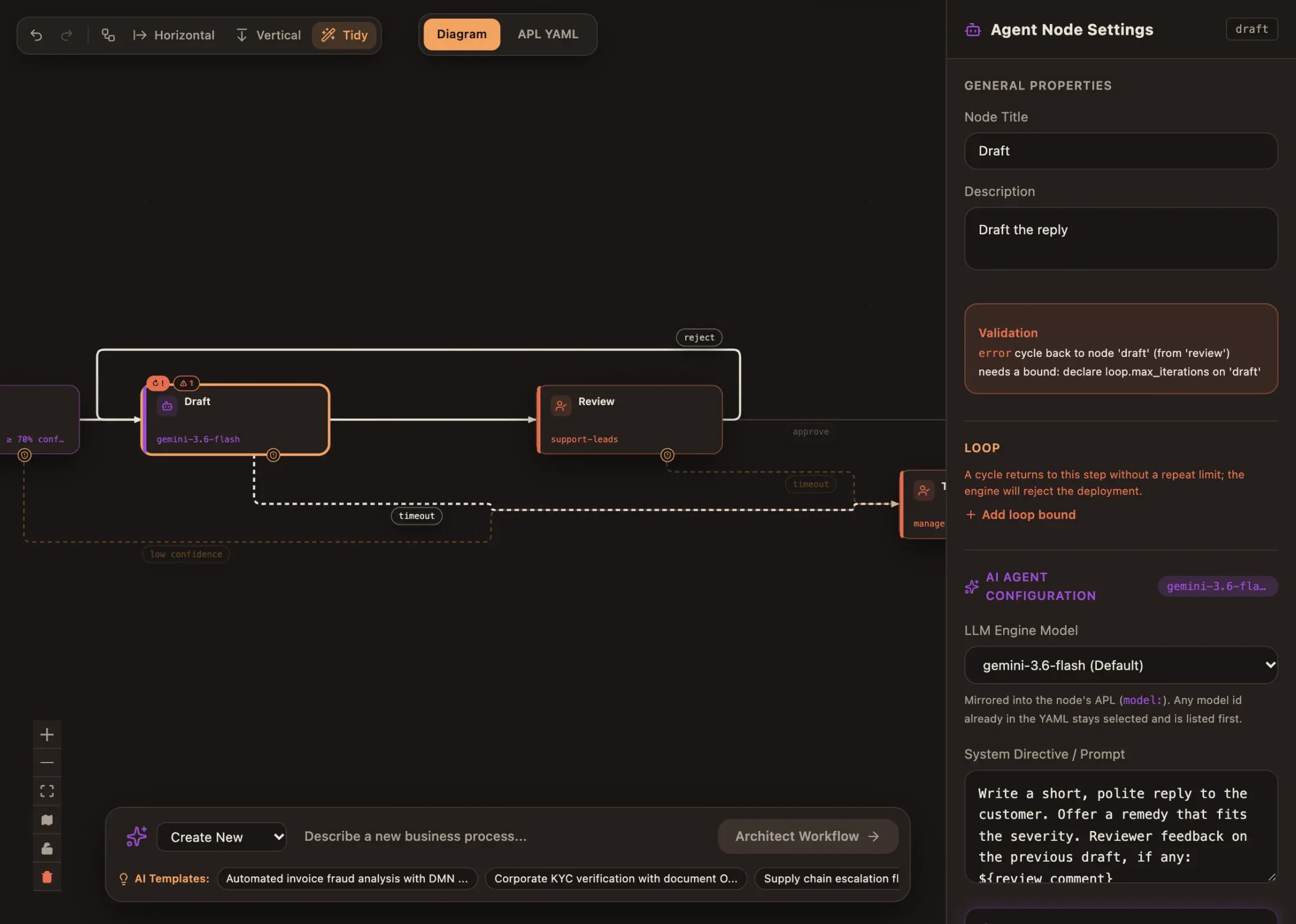
In Studio, a loop step shows ↻ 3. A cycle without a usable limit turns the
step red (↻ !) with the engine’s message and an Add loop bound button in
the inspector:
Review decisions
Section titled “Review decisions”A human step can ask for a decision instead of a plain “done”. Each outcome says where the process goes and whether the reviewer must explain it:
- id: review type: human-input assignees: [support-leads] outcomes: approve: { next: sent } reject: { next: draft, comment: required }- Two to six outcomes, named in lowercase (
approve,request_changes; up to 32 characters). A step with outcomes has nonext. - The reviewer sees one button per outcome and a comment box in the Task Inbox. The engine refuses an unknown outcome or a missing required comment — the UI is a convenience, not the guard.
- The decision is stored in
review_outcomeand the comment inreview_comment, so the next step can use them. Here the agent reads${review_comment}and rewrites its draft. - History records the outcome and the comment length, never the comment text.
- Clients decide with
POST /api/v1/projects/{projectId}/tasks/{taskId}/decisionand a body{"outcome": "reject", "comment": "…"}; a plain complete is refused on a step that declares outcomes.
In BPMN, the same decision is a user task with abada:outcomes (see BPMN
import and compatibility).
Weak or malformed AI answers
Section titled “Weak or malformed AI answers”The engine checks every agent result before it touches the process:
- id: classify type: agent output_schema: type: object required: [category, severity] confidence_threshold: 70 on_low_confidence: triage # _confidence missing or below 70 on_invalid_output: triage # result does not match output_schemaWithout these routes, a rejected result counts as a failed attempt and is
retried; the last failure follows on_error or opens an incident.
Errors
Section titled “Errors”on_error is taken when a worker reports an error, or when the last attempt
of a step fails. A list routes specific error codes first:
- id: sync-crm type: engine-task service: crm-sync on_error: - { code: CUSTOMER_UNKNOWN, then: create-customer } - { then: manual-fix } # any other errorWithout on_error, a step that fails for good stops the instance with a
WORK_FAILED incident. Agent, engine-task and human steps all accept
on_error.
Timeouts
Section titled “Timeouts”on_timeout stops a step after an ISO-8601 duration (PT30M, PT2H, P2D;
from one second to 365 days), cancels its work and continues at then:
on_timeout: { after: P2D, then: triage }The clock covers retries and rate-limit waits. Agent, engine-task and human steps accept it.
Service levels
Section titled “Service levels”sla_hours is a promise, not a deadline. When it passes, the task stays
open, the escalate_to groups can claim it too, and a TASK_SLA_BREACHED
event is sent:
- id: review type: human-input assignees: [support-leads] sla_hours: 4 escalate_to: [managers]Combine it with on_timeout when the task must also end at some point.
Fallback models
Section titled “Fallback models”- id: draft type: agent model: gemini-3.6-flash fallback_models: [gpt-5-mini]The worker tries the next model only when the one before is unavailable —
rate limit (HTTP 429), quota, timeout, 5xx or unreachable — never because of
its answer. Every model must be on the engine’s allow-list. When none can run,
the attempt waits (the provider’s Retry-After, then a growing delay capped at
15 minutes) and retries without using up max_attempts.
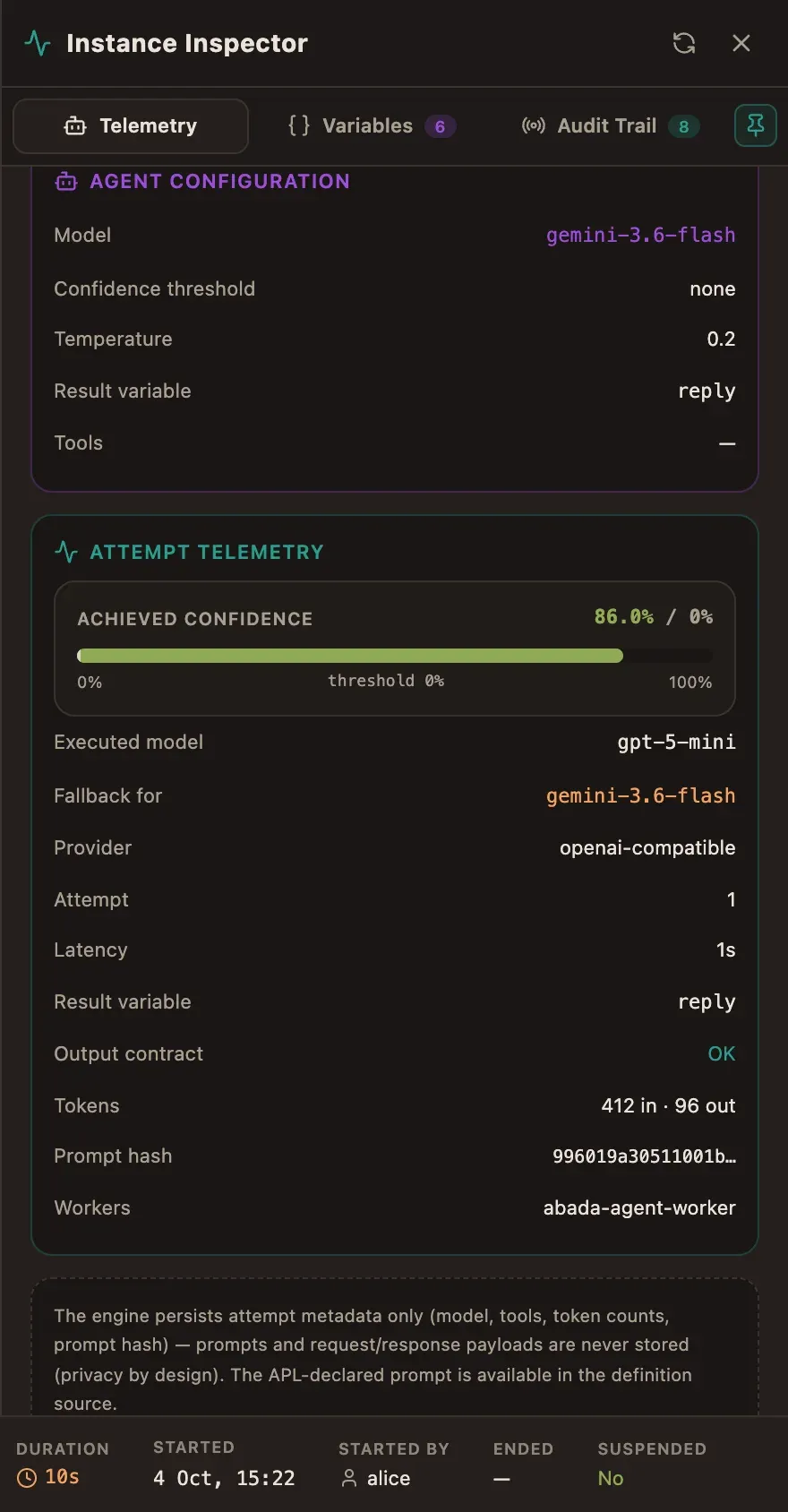
The attempt telemetry shows the model that answered and the one it replaced:
Edit routes in Studio
Section titled “Edit routes in Studio”Everything above can be built on the canvas; the APL stays the source of truth.
-
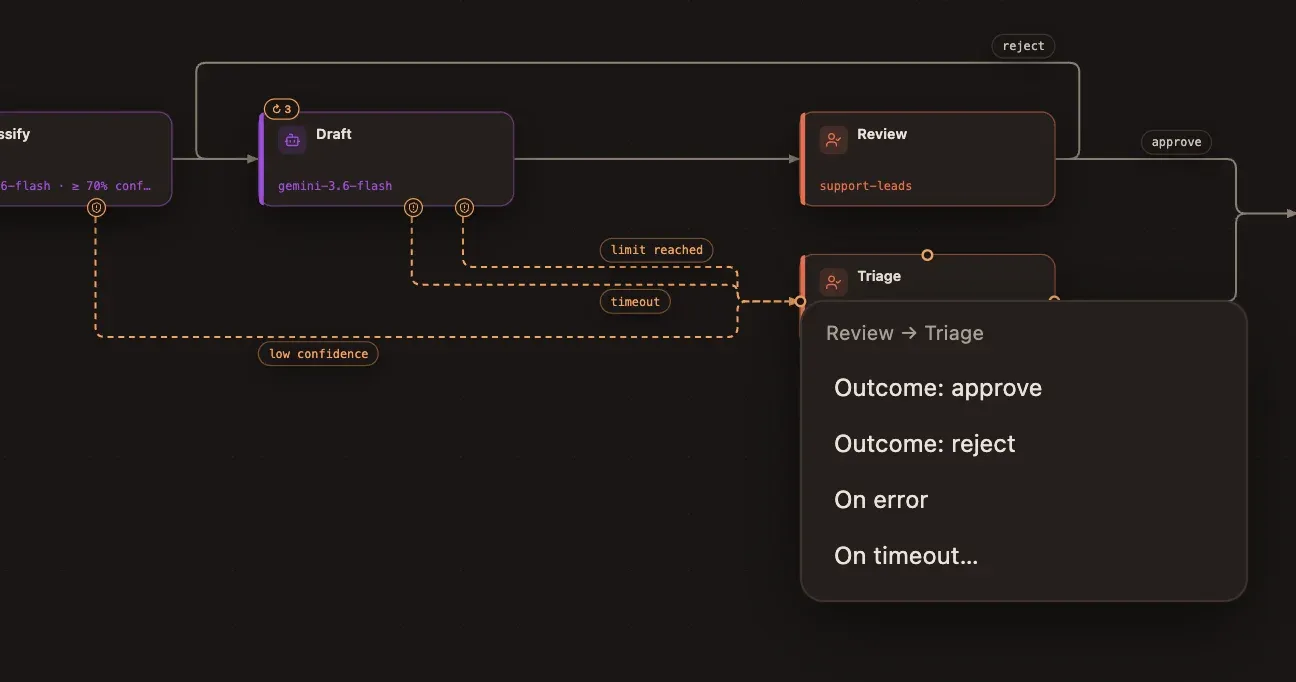
Draw a connection from a task: a menu asks what it means and offers only the routes that step supports — Next step, On error (optionally for one code), On timeout… (with its duration), Low confidence and Invalid output for agents, each review Outcome, and Loop limit reached on a loop step. A new Next step replaces the old one.
-
Delete a route: click the edge and press Delete. The route it stands for is removed from the APL. Deleting a step removes every route that pointed at it.
-
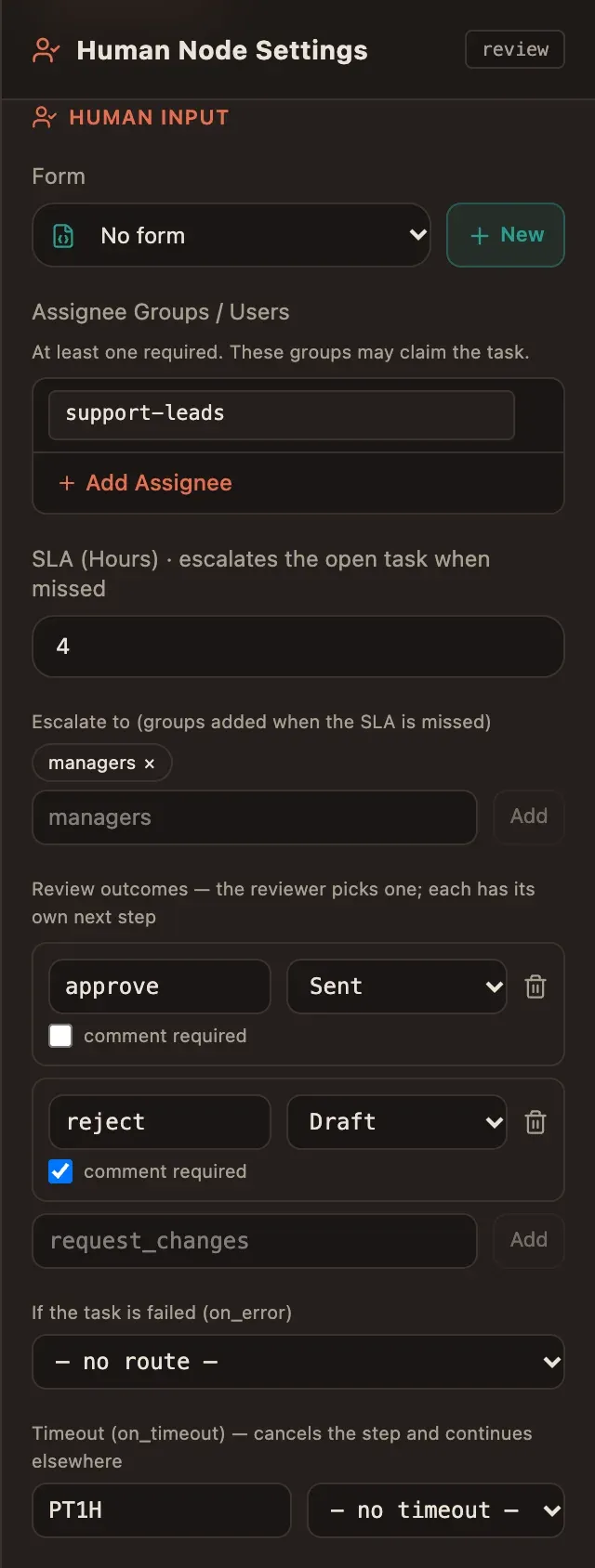
The inspector edits the same routes: error routes by code, the timeout, fallback models, escalation groups, outcomes (name, target, comment required) and the repeat limit.
-
Badges:
↻ 3on a loop step, red↻ !on an unbounded cycle,⚠ nfor engine validation issues about the step (listed in the inspector). -
Each edit is one undo step (⌘Z / Ctrl+Z).